
Do you have the correct guide?, please be aware this guide is for legacy systems.
When an MHUB video device is paired with an MHUB AUDIO device we call that a Stack. Stacks can contain up to 4 MHUB products with 1 Master device and 3 slave devices. Master devices can be either VIDEO or AUDIO, slaves are AUDIO only.
Below are a few examples of stacked systems.
- Master : MHUBPRO4440, Slaves : 3x MHUBAUDIO64
- Master : MHUBAUDIO64, Slaves : 3x MHUBAUDIO64
- Master : MHUB4K44PRO, Slaves : 2x MHUBAUDIO64
To create a stacked system you will need to download uControl (available on iOS and Android app stores), and your MHUB hardware will need to be powered on and connected to your network.
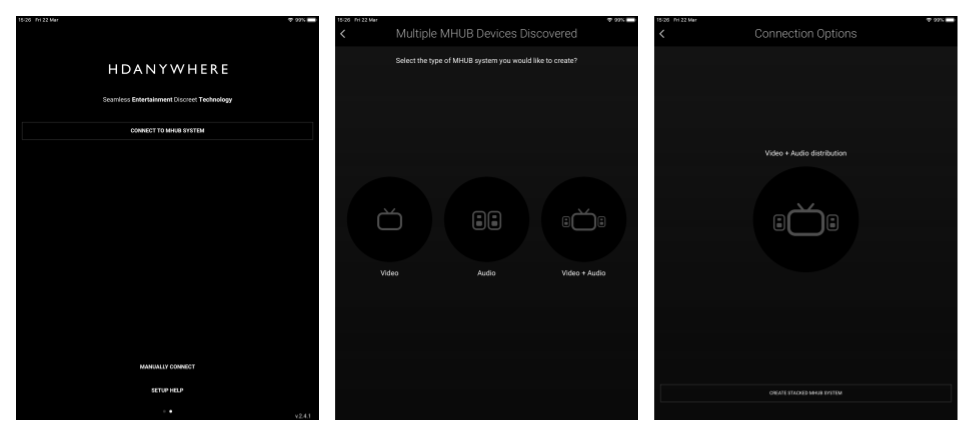
Open the uControl app and select ‘Connect to MHUB System‘. The following screens will be displayed. uControl will search your network for all MHUB devices. To create a stack select ‘Video + Audio‘
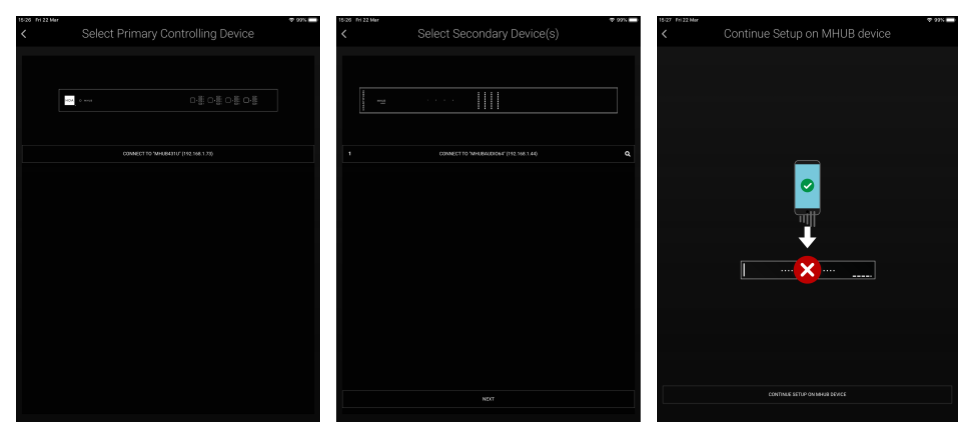
uControl will now ask you to select first a master device, then upto 3 slave devices. (The order in which you select the slave devices will be their order in the stack. this is indicated by a numeric value on the left side of the device button. If you are unsure which MHUB AUDIO device is which you can simply click on the Identify button at the side of each device which will start the HDA and AUDIO logo flashing.)
Once this is done you will be taken to MHUB-OS where the first boot Process will be run.
MHUB FIRST BOOT PROCESS(link)