Author: HDA Support Team

  • Can my MHUB support uControl Remote 2?

    Can my MHUB support uControl Remote 2?

    If you are thinking about upgrading your existing MHUB system to support the newly announced uControl Remote 2 then you have two options available to you: 1) upgrade your system capability with a control processor or 2) use AI or the open source community to write an integration for your system. The pros and cons of each option and systems supported are detailed below:

    Option 1: Upgrade your MHUB by adding a new uControl Controller to it

    A controller, such as the uControl Zone Processor 5, can be added to the following systems to allow it to work with uControl Remote 2. Adding a controller to your MHUB brings additional benefits in the form of IP control, smart automation for lighting and blinds and access to the new uControl app.

    Whilst this option requires a further investment to upgrade your hardware, it is the simplest to deploy and is available to purchase today.

    Note: the uControl Remote 2 will be bundled with a more powerful controller upon release in new hardware called the uControl Connect Hub. This is an optional further upgrade should you wish to future-proof your system.

    If you have the following MHUB system then it will work with a controller upgrade.

    • MHUB (4×1+1) 100A
    • MHUB (4×4) 100A
    • MHUB (6×6) 100A
    • MHUB S (8+8×8) 100A
    • MHUB S (16+16×16) 100A/DM

    Older MHUB systems
    If you own a legacy or discontinued MHUB and wish to upgrade to uControl Remote 2 then the same controller is required but your MHUB must meet the following requirements.

    • MHUB U (4×3+1 & 8×6+2)
      MHUB-OS 8.21 or higher
    • MHUB PRO 2 (4×4 &8×8)
      MHUB-OS 8.21 or higher
    • MHUB S (8+8×8) 100
      MHUB-OS 8.2x

    If you own one of the systems above, it is important to note some caveats:

    1. The AV setting page on your controller may stop working and may become unresponsive; this will mean settings like EDID, scaling and audio settings will need to be manually set via a direct command.
    2. Slave (if your system comprises of more than one HDA device) auto-healing is not supported; this means that if the MHUB is not fixed to a IP address (MAC reservation or static IP) if it moves, the controller will be unable to automatically search and update the address requiring a manual intervention.

    Option 2: Someone writes or builds an integration (no controller needed & potentially free)

    The uControl Remote 2 is special because the code that programs it is completely open. This means that anyone (or any AI) could write an integration for your MHUB which can pull data from your system and use that to program the Remote 2. This effectively means that all MHUB systems can be upgraded to support any MHUB manufactured since 2016. Our recommendation is to ask on any of the uControl Development and Hackers group to see if such integrations exist or if you would like to tackle it as a project for yourself.

    • MHUB PRO (4×4) 40
    • MHUB PRO (4×4) 70
    • MHUB PRO (8×8) 40
    • MHUB PRO (8×8) 70
    • + all of the devices listed above

  • uOS Core & Studio: what this means for MHUB, MZMA and Zone Processors

    As part of the ongoing evolution of the HDA platform, MHUB and MZMA devices are transitioning to uOS Core.

    At a Glance

    • The full uOS platform is now called uOS Studio and runs on the uControl Zone or Connect Processor.
    • From June 2026, MHUB and MZMA devices now ship with uOS Core
    • MHUBs currently running uOS 11.08 will receive one final update to uOS 11.09
    • uOS on MHUB/MZMA is now discontinued.
    • MHUBs purchased before June 2026 retain their existing uOS features.
    • From 11 March 2026, existing MHUB or MZMA systems will only receive small stability and security updates.
    • If your system is working well today, there is nothing you need to do.

    This update simplifies the role of MHUB devices, allowing them to focus entirely on what they do best: reliable switching, distribution, and secure cloud connectivity. At the same time, the full automation and integration capabilities of the platform are moving to uOS Studio, running on the uControl Zone/Connect Processor.

    This architecture reflects how most professional installations are already designed — with a dedicated controller managing the system and distribution hardware handling switching.

    The result is a more stable, scalable, and future-proof platform for both integrators and end users.

    What this means for existing systems

    If your MHUB or MZMA system is currently working well, there is nothing you need to do. Your system will continue to operate normally.

    However, the way new features and system expansion will be delivered is changing.

    Topic What’s Changing What It Means For You
    Buying new MHUB and MZMA will ship with uOS Core and will not support uControl natively. If you wish to use uControl with your MHUB or MZMA you will need to purchase a uControl Zone or Connect Processor.
    Operating System on MHUB / MZMA MHUB and MZMA devices now run uOS Core, a streamlined version of uOS focused on switching and connectivity. This improves reliability and simplifies setup, particularly when using third-party control systems.
    Full uOS Feature Set The full uOS platform is now called uOS Studio and runs on the uControl Processor. Advanced automation features such as sequences, scenes and integrations are now handled by a dedicated controller.
    Support for uOS on MHUB uOS running directly on MHUB and MZMA devices is now discontinued as of 11 August. Existing systems will continue to operate, but new platform development will focus on uOS Studio.
    Future Software Updates From 11 March 2026, uOS on MHUB/MZMA will only receive small stability and security patches. No new features will be added to MHUB-based uOS systems.
    Expanding or Upgrading Your System To continue adding new uOS features, systems must include a device that runs uOS Studio. This typically means adding a uControl Processor to your system.
    System Architecture Systems using uOS Studio operate as a stacked system. The uControl Processor becomes the system controller, while MHUB handles video distribution.

    Do I need to upgrade?

    If you are happy with your current system and it is performing well, there is nothing you need to do. Your MHUB or uControl system will continue to operate normally.

    You may want to consider upgrading if you plan to:

    • Add new integrations or automation features
    • Expand your system with additional rooms or devices
    • Take advantage of future uOS platform developments

    In these cases, adding a uControl Processor running uOS Studio will unlock the full feature set.

    When upgrading, your system will need to be reset and configured as a stacked system, where the uControl Processor manages the MHUB and any other HDA devices.

    Need help or more information?

    In these cases, adding a uControl Processor running uOS Studio will unlock the full feature set.

    When upgrading, your system will need to be reset and configured as a stacked system, where the uControl Processor manages the MHUB and any other HDA devices.

  • Using the HDC Trade Modular System Builder

    The Modular System Builder is an invaluable tool when you need to get a quote or setup a Modular system quickly and correctly. But before you do start configuring your system make sure that you note the following:

    1. The Modular Chassis options for the 4×4 and 8×8 have different power requirements.
      1. The 4×4 can be fitted with an optional PSU module if a redundant power supply option is needed. It’s should be set to 1 as a default.
      2. The 8×8 has its power supplies built in to the unit. There is no need to add any if you are specc’ing one of these.
    2. IEC power cables
      1. You will need x1 cable per PSU module, again the default should be set to 1
      2. 8×8’s will require x2 IEC cables are the main unit contains two power supplies
    3. Blank plates for unused ports can only be added to 8×8 systems
    4. Forwards IR is only supported by the 8×8 and needs additional configuration – please call us 01684 576 348 if you need this functionality or contact us.
    5. IR hardware is sold as an individual units, you will need to add as many transmitters and receivers as you need, HDMI Input/Output modules do not support IR Passback
    6. HDanywhere SmartControls are pre-programmed to operate with the Modular Chassis included in the builder.
  • Comparing HD matrices on a like-for-like basis

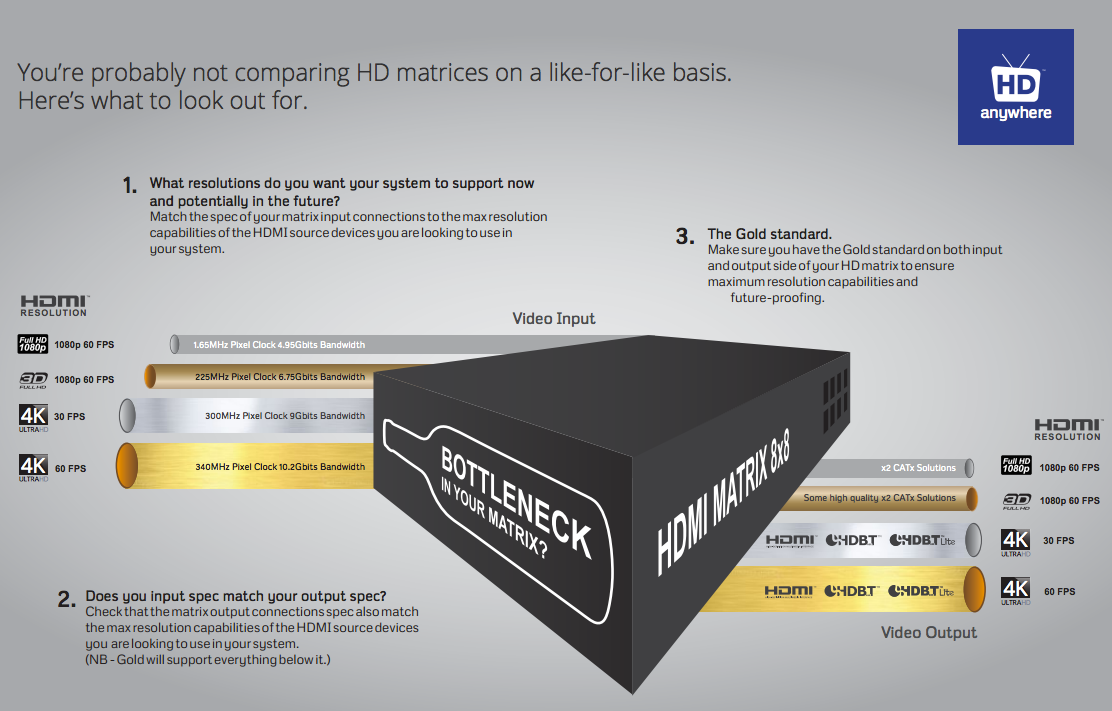
    matrix-like-for-like

    Click here for enlarged image: matrix-comparison

    With all the technical jargon and various names given to 4K video, it’s difficult to properly compare HD matrices on a like-for-like basis. So here’s our HD matrix buyers guide to help simplify things.

     1. Ask yourself, what is the maximum resolution you want your system to support now and in the future?

    To help, you can look at the maximum resolution of your displays and / or HDMI sources that you want to connect to the HD matrix. To date, there are very few 4K sources, but lots of 4K capable displays. So you may only have 1080p sources, but 4K displays. So the choice is often if you would like 4K support from your HD Matrix or not, in order to future proof yourself for the eventual arrival of 4K capable source devices.

    To understand the resolutions in the table below in greater depth, you can click here for our more detailed 4K support article.

    Once you’ve decided on the support you’d like your HD matrix to have, you can match it off to the chipset specification required by studying the table below.

    This chipset specification can then be compared across HD matrix products. We’ve also broken the typcial chipset speeds down into levels to help make the next stage easier.

    (NB – Platinum will support all Gold resolutions, Gold will support all Silver resolutions and Silver will support all bronze resolutions.)

    Input Side Level

    Maximum Resolutions Supported

    Typical HDMI Chipset Specifications

    Platinum

    HDMI 2.0

    4096×2160 @ 60Hz 4:4:4

    600 Mhz Pixel Clock

    18 Gbits Bandwidth

    Gold

    HDMI 1.4

    3840×2160 @ 60Hz 4:2:0

    4096×2160 @ 30Hz 4:4:4

    1080p @ 60Hz 3D

    340 Mhz Pixel Clock

    10.2 Gbits Bandwidth

    Silver

    1080p @24Hz 3D

    1080p @ 60Hz

    720p @ 60Hz 3D

    165 Mhz Pixel Clock

    4.95 Gbits Bandwidth

    Bronze

    1080p @ 24Hz

    720p @ 60Hz

    1080i @ 60Hz

    75 Mhz Pixel Clock

    2.25 Gbits Bandwidth

    2. Therefore, which type of output technology do you need? 

    Next, it’s important to match your desired resolution support to an output technology level that supports that resolution. So you can match gold to gold for example from the previous table.

    Once you’ve chosen the appropriate level, there can be multiple types of output technology at the same level. So your choice between them may be based on features other than resolution capability. For a full breakdown of the different types of output technology on offer and their key features, you can read our article here.

    You can then compare HD matrices looking for the required or your chosen technology.

    (NB – Platinum technology will support all Gold technology resolutions, Gold technology will support all Silver technology resolutions and Silver technology will support all bronze technology resolutions.)

    Output Side Level

    Maximum Resolutions Supported

    Output Technology Choices

    Platinum

    4096×2160 @ 60Hz 4:4:4

    Native HDMI 2.0

    Gold

    3840×2160 @ 60Hz 4:2:0

    4096×2160 @ 30Hz 4:4:4

    1080p @ 60Hz 3D

    All Platinum Choice and:

    Native HDMI 1.4 (High Speed)

    HDBaseT-Pro (100m CATx Soltution)

    HDBaseT-Lite (70m CATx Solution)

    Silver


    1080p @24Hz 3D

    1080p @ 60Hz

    720p @ 60Hz 3D

    All Platinum and Gold Choices plus:

    Some high quality (non-HDBT) SingleWire & TwinWire 2x CATx solutions. Such as the HDAnywhere mHub.

     Bronze

    1080p @ 24Hz

    720p @ 60Hz

    1080i @ 60Hz

    All Platinum, Gold and Silver Choices.

    3. Lastly, make sure your matrix doesn’t have a bottleneck.

    A HD Matrix is most commonly made up of three main stages. The input stage, the multiplexing stage and the output stage.

    It’s vital to check that each stage of the matrix has the same chipset capability or resolution capability. Most manufacturers will list the chipset speeds they are using and will group together the input stage and the multiplexing stage. Always seek clarification if this is not clear.

    Some HD Matrices will have a Gold level input specification, but a silver level output. The result of this is that whilst you may be able to send into the HD matrix a 4K signal (such as 3840×2160 @ 60Hz 4:2:0) you cannot output it from the HD matrix to a TV. So the HD matrix does not have 4K support throughout.

    If you work through the above and check in enough detail, you should get what you expect from your HD matrix purchase.


  • ULTRA HD 4K Q&A

    Answers to various 4K / Ultra HD questions we’ve been asked recently…

    What is the content availability for Ultra HD/4K currently?
    Very limited right now. In the US, Sony are shipping pre-loaded media servers with their 4K panels (in what seems to be a stop-gap measure) until an industry-ratified medium comes along. This will most likely be answered by Blu-ray, with the BDA working on defining a new expanded and elevated specification right now, expected for release later this year.

    Why do home technology professionals need to be aware of Ultra HD/4K? Are consumers buying into this new technology?
    The need to be aware because it’s happening now. It’s possible some are thinking of it as 3D – a passing fad or a peripheral feature. In reality it is similar to the leap we made from SD to 1080p; it’s being supported by SMPTE, studios and vendors alike to such a high level that most in the community are not yet aware. Consumers will inevitably buy into the technology, but it will take time. Serious penetration won’t happen until prices come right down and content is broadly available. Ten years ago you could only get 1080p by upscaling before Blu-ray (and HD-DVD) came along in 2006, but look at it now – 1080p is ‘normal’. The 4K path will be the same, albeit in a much shorter timeframe.

    What are some common misconceptions about Ultra HD/4K?
    Misconception one – there’s no content. OK, it’s true right now – but it’s close. There is actually already an impressive back catalogue of movies in 4K – but the new BD spec needs to be released (and new players to implement it) before we’ll be able to truly tap in.
    Misconception two – it will deliver no benefit: The resolution would exceed our own visual acuity. Look back through recent history – there was a time that an 34” TV (not rear pro) was regarded as HUGE. Now 42” is small, 50-60′ is normal, and even sizes up to 84” are gaining popularity. However we’re not sitting further away than we used to. IMAX cinemas allow a much bigger picture with relatively close seating by increasing picture resolution. 4K panels and content will do the same.

    Can you suggest one way Ultra HD/4K will help the bottom line?
    There are a few opportunities for 4K to help drive business:
    Old install refurbishments: all-new hardware and possibly even new cabling.
    New 4K sales and installation requirements.
    It defers cloud based delivery methods and in-home wireless technologies (for AV), reducing the DIY plug-n-play capability of consumers. That is, the high bandwidth specialty installation of 4K sustains the need for a professional integrator, with a chance for more hardware sales.
    It will even help software (BD disc) sellers as 4K reduces the threat of downloads due to sheer file size and delivery bit rates.

    On the technical side, where will the common mistakes be made?
    Cables mislabelled: 4K is deliverable via HDMI at one fixed clock speed of 297MHz (up to 30 frames). This equates to an aggregate data rate nearing 9Gbps, which before the year is out will double again with an upcoming new HDMI spec. Although the existing ‘High Speed’ HDMI cable spec technically has this 9Gbps rate covered, many HDMI cables are possibly not accurately labelled.

    Devices simply not capable: The big ‘gotcha!’ is with devices and the HDMI silicon they contain. Currently most devices employ HDMI chipsets (transmitters & receivers) that are limited to 225MHz, or 6.75Gbps, emanating from 2006 specifications. This is clearly insufficient for 4K, even with firmware upgrades. The pipe simply isn’t big enough. Many HDMI extenders, switchers, splitters, matrix switchers etc, on the market also contain this restricted silicon, and so are not adaptable to 4K applications. Even if the silicon is upgraded, length potential will be much reduced, perhaps by more the half. CATx cable has become a favourite choice for installers for HDMI extension but 4K fundamentally challenges the limits of this cable type. Technologies like HDBaseT already address this through proprietary firmware driven timing technologies, but it’s no longer native HDMI. Matrix switchers with HDBaseT will generally still perform the cross-point switching in the HDMI space, so they may still be restricted even though the HDBaseT stage is capable of more.

    Do you have a final comment?
    4K is not only coming, it’s here. We’ll exist in a world of upscaling and some proprietary file delivery for perhaps a year or two, then things will turn very quickly to more mass-market. The challenge for the custom installer is that they are expected to pre-wire jobs for future 4K support NOW, even though they can’t yet even test what they’re putting in for validation. They will need to rely on their product suppliers and a leap of faith that the products will deliver as expected, when expected. The phrase ‘futureproof’ is scarier and more difficult to define than ever.
    The new HDMI spec will push data rates up to at least 18Gbps, driving the need for all-active connectivity and pretty much wiping out CATx cable as a viable extension cable option (other than possibly HDBaseT).

    It’s exciting times ahead with the best sales opportunities opening-up to those that learn the basics NOW and stay ahead of the curve.

  • A quick introduction to Ultra HD 4K

    Ultra HD began its life known as ‘4K’. The term 4K was officially adopted by the HDMI® organisation in 2009. In October 2012, the 4K working group of US-based organisation CEA renamed 4K to Ultra HD.

    Regardless of its title, Ultra HD it is a video format offering four times the resolution of what is known as 1080p. Ultra HD has been also referred to as ‘4Kx2K’, ‘4K/2K’, and ‘Quad HD’. In simple terms, 1080p video (what is called ‘Full HD’) is actually like viewing a 2 megapixel photo. 4K, however, is the equivalent of viewing an 8 megapixel photo. 1080p = 1920 x 1080 pixels. 4K = 3840 x 2160 pixels (consumer version)

    What are the requirements for viewing Ultra HD?

    1. Displays:
    Ultra HD is initially dominating the high-end purist projector format, where it is most beneficial to improving the viewing experience. Sony have already shipped their first 4K projector. As of November 2012, it is appearing in flat panel displays due to consumer demand and/or manufacturers value-adding.

    2. Sources:
    The Blu-ray disc format is compatible with Ultra HD content once enough layers to hold the data are incorporated into the disc. A new ‘Ultra HD capable’ BD player will be required, of course.

    3. Content:
    As of November 2012, the movie industry is gearing up for Ultra HD content. James Cameron’s Avatar 2 will be filmed in Ultra HD and other high profile directors are working with Ultra HD cameras now. Back catalogue film negatives are being transferred to Ultra HD digital masters.

    4. Cables:
    From a cabling point of view, Ultra HD video will actually be the first true technical/performance challenge to many long length HDMI cables which claim to be High Speed.

  • HDMI 2.0 – key features of the new specification.

    HDMI 2.0 was unveiled to the world at IFA Berlin in September.  Following this, Aussie company Kordz, stocked in the UK by HD Connectivity, became the first approved HDMI 2.0 Adopter in the world, outside of the HDMI Forum, and is the only HDMI 2.0 Adopter in Australia.  Founder David Meyer lifts the lid on the key features, inner workings and potential pitfalls of this new specification.

    Each time a new version of HDMI is announced, there follows a buzz of new features and formats, but also a groan from the custom installation community as to what the implications may be.  HDMI 2.0 paves the way for some fantastic new video and audio capabilities, but no need to panic – the changes may not run as deep as you might think.  Ultimately HDMI 2.0 will settle into a place of normality, as has happened with every iteration before it.

    So what does HDMI 2.0 offer, how is it different, and what are the headline features that you need to know about?  Let’s take a look.

    Development of HDMI 2.0

    HDMI 2.0 is the first major HDMI specification release since version 1.4 back in 2009, so it’s fair to say a lot has changed, and it needs to.  There are now two HDMI organisations;

    • HDMI Licensing, LLC, with its seven founder companies.  Developers and managers of the HDMI 1.x generations, and now also appointed licensing, marketing and compliance managers of HDMI 2.0,
    • HDMI Forum, Inc., a non-profit corporation founded in 2011, with more than 80 member companies for broader market development of future versions of HDMI,

    An important point to note is that HDMI 1.4b remains as an ongoing specification, with HDMI 2.0 running concurrently with its subset of additional optional features and enhancements.  Existing HDMI Adopters do not automatically get an upgrade; they must sign an addendum and be accepted before they can become adopters of HDMI 2.0.

    Key Features of HDMI 2.0

    Here’s a summary of some of the key new features of HDMI 2.0;

    Video

    • 2160p/60 (4K) 8-bit 4:2:0 in the existing 9Gbps data rate (previously 30fps limited),
    • 2160p/60 (4K) 10 or 12-bit 4:2:2 colour at a new higher speed of 18Gbps,
    • Anamorphic video modes for 2.37:1 picture,
    • New ‘Dual View’ video mode for two simultaneous full screen 1080p images (on 3D backbone),

    Audio

    • Up to 32 channels of One Bit audio to 192kHz, and up to 1536kHz sampling in 2-channel mode,
    • New 10.2, 22.2 and 30.2 channel modes for ‘3D Audio’ speaker placement,
    • Up to 4 simultaneous audio streams to accompany Dual View video or multi-language,

    Other

    • New 2.0 clock mode, EQs and data scrambling for transmission robustness,
    • New improved CEC 2.0, HDCP 2.2 support, and expanded applications for DDC.

    In this article we’ll focus on 2160p, touching on anamorphic, but coming back to explore audio some other day.

    Emerging Trends – 4K TV Firmware upgrade to “HDMI 2.0”

    The first key new feature of HDMI 2.0 out of the gate is the upgrade of 2160p (4K) to 60 frames per second within the existing defined HDMI bandwidth, where previously it was limited (under HDMI 1.4) to 30fps.  Both Sony and Panasonic have recently announced firmware updates for their existing 4K TVs to enable this feature, indicating that there is no new hardware (aka ‘speed’) required.  As an aside, they tend to tout this upgrade as “HDMI 2.0”, but that’s a non-compliant practice as it’s actually just one of a multitude of new features of HDMI 2.0 that they’re talking about.  What they really mean is that the firmware just adds newly defined support 2160p/60, 8-bit 4:2:0… assuming the existence of content.

    So how is it possible to double the frame rate without doubling the bandwidth?  The answer lies in the ‘…8-bit 4:2:0’ reference; save on colour data, give back in frame rate.

    Chroma subsampling and pixel data packing

    Chroma subsampling is a process of compressing, or rather stripping out colour data to reduce file size &/or video transmission bandwidth load.  The premise is that the human eye is far less sensitive to colour than in is to brightness and grayscale, by a factor of 20, in fact.  As such, the amount of colour information in video can potentially be reduced without us really noticing… or that’s the plan.

    The trick is to leave the resolution and gray scale untouched, which is why it’s only applicable to Component video (YCbCr) signalling, where the separate luminance (Y) channel can be left intact.  The most common chroma subsampling methodologies are 4:2:2 with half colour data when compared to 4:4:4 original, and then there’s 4:2:0 (as used with DVD & Blu-ray) with just one quarter of the original colour data.

    The sampling commonly occurs over a 2×2 pixel array, where each pixel comprises a Luminance channel (Y) and two Chrominance channels (Cb & Cr).  Fig.1 below shows a simplified depiction of the uncompressed array before any subsampling, called 4:4:4.  Fig.2 shows how HDMI 1.4 (and prior) handles YCbCr, where everything from 8-bit 4:2:0 to 12-bit 4:2:2 produces precisely the same bandwidth at a constant 96 bits per array (same as 8-bit 4:4:4).  Fig.3 depicts 4:2:0 as it really should be, being how HDMI 2.0 handles it; with 8 bits of ‘Y’ per pixel, and just one of each 8-bit colour component Cb & Cr across the whole 2×2 array.

    What they’ve done with HDMI 2.0 is recognise that 8-bit 4:2:0 natively nets 48 bits per sample array, and they’ve actually passed on the savings.  That is, they halve the bandwidth, which enables them to then double it again with frame rate.  Voila, 30fps goes to 60fps in the same bandwidth as before.  Note this is ONLY applicable to 8-bit 4:2:0.  This is not where HDMI 2.0 stops – there’s even better formats on the horizon.

    HDMI 2.0 Need for speed

    There are several formats of 2160p (4K) that are included in the HDMI 1.4 specification, all of which run at 8.91Gbps, the specification then capping out at 10.2Gbps.   HDMI 2.0 introduces some more at this legacy level, and several superior combinations at double this rate, being 17.82Gbps (rounded to 18Gbps, 6Gbps/ch).  This is well beyond the limits of HDMI 1.4, and defines the top end of HDMI 2.0.  The range above 10.2Gbps is referred to as “HDMI 2.0 mode”, whereby the TMDS Clock is slowed to 1/40th of the data rate to counter the effects of EMI at such high speeds.  Other techniques like data scrambling are also employed to improve stability.

    HDMI 2.0 Cables

    Right off the bat – THERE IS NO SUCH THING!  If anyone offers you so-called “HDMI 2.0 cables”, turn and run.  It will be either a marketing tactic, or expression of ignorance.  Either way it’s non-compliant.  When the HDMI 2.0 specification was first announced, it was accompanied by this statement;

    “..Current High Speed cables (category 2 cables) are capable of carrying the increased bandwidth.”
    – HDMI Licensing, LLC, Press Release, 4 Sep 2013
    http://www.hdmi.org/press/press_release.aspx?prid=133

    There is no new speed, no new cable.  Does it make sense that a cable rated to 10.2Gbps can then carry up to 18Gbps?  Logically no, but they have some tricks up their sleeve.  2.0 introduces a parametric-like new sink EQ system which supposed to make a 10.2Gbps tested cable perform up to 18Gbps.  It can’t however fully compensate for the collapsing effect of cable length, and will be expected to cap out at around 3m with a decent cable.  Beyond that, it’s all bets off and there is no new cable spec, speed or directive.  My prediction – HDMI cables will have to turn active, as some already have.

    2.37:1 Cinemascope

    Another fantastic feature of HDM I 2.0 is the ability for it to support different pixel aspect ratios, namely 4:3 (nothing to do with 4:3 TV, by the way).  Eg; a 1080p image is comprised of 1,920 pixels wide and 1,080 pixels high.  Every pixel is square, so content is fed to each pixel in 1:1 ratio.  The array of 1:1 pixels then determines overall image aspect ratio, being 1.78:1, or 16:9.

    What HDMI 2.0 has introduced is the ability for content to be formatted using 4:3 pixel ratio.  Every pixel in a supporting display could potentially be fed 4:3 anamorphic content, even though the pixel is still 1:1 square.  In practice, a projector with a matching anamorphic lens will horizontally stretch the image by 1/3 (4:3).  The result is 2.37:1 picture aspect ratio (1.78/3)x4 = 2.37.

    No more encoded black bars.  It means we can look forward to maximising image resolution for cinemascope 2.37:1 in a standardised format.

    Summary

    HDMI 2.0 brings many benefits and some exciting new features, paving the way for a level of AV immersion the likes of which we’ve never seen.  Yes it means new hardware, but that points to opportunity for the custom AV dealer/installer.  HDMI speeds are ever increasing, and that means more demand on quality infrastructure to ensure everything works as planned.

    Imagine a premium 2160p/60 2.37:1 aspect home cinema projection system with brilliant 12-bit 4:2:2 colour and 10.2 audio system.  How about dual-view gaming with 2 players each experiencing their own full screen 1080p image on the same TV, with separate audio tracks being fed to their headphones?   Or to really make your head spin, imagine an IMAX Private Theater ™ with 30.2 channel 3D digital sound.  Phwoah!

  • Modular IR, IP and Serial Commands (4×4 and 8×8)

    MOD44 / MOD88 control commands

    This video distribution range was discontinued in 2015 and only limited support will be provided from HDANYWHERE.

    A link to our control API can be found here for IR, IP and Serial commands.

  • Control Drivers for Modular Series (IP / RS232 / IR) – Modular 4×4, Modular 8×8 and mHub 4K (IP)

    Control Drivers for Modular Series (IP / RS232 / IR) – MOD44 and MOD88 & mHub 4K

    We have ready-made control system drivers available for Modular series systems for the major control systems used in the UK. These are currently IP based.

    (more…)

  • HDanywhere Modular 8×8, 4×4 and mHub 4K Product Support For Loxone

    HDanywhere Modular 8×8, 4×4 and mHub 4K Product Support For Loxone

    We are pleased to say that we have an IP based ready-made control system driver for Loxone for HDanywhere Modular 8×8 and 4×4 and the mHub 4K. The driver currently supports video switching and may grow to encompass larger parts of the API over time. The driver now comes bundled inside the Loxone Config software so no download is required.

    (more…)